Pockhop: A Versatile PowerPoint Template for Modern Presentations
Creating a presentation that captures attention from the first slide to the last is rarely about having the most complex data. It is about clarity, visual rhythm, and a design system that supports your narrative rather than distracting from it. This is where Pockhop - Powerpoint Template steps in as a practical solution for professionals who need to communicate ideas effectively without spending hours on layout adjustments. Whether you are a marketer pitching a new campaign, an entrepreneur seeking investment, or a educator structuring a lecture, the foundation of your deck matters immensely.
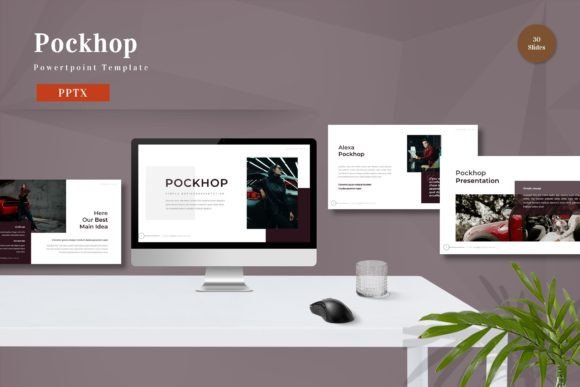
Pockhop is not just a collection of slides; it is a comprehensive design asset built for flexibility. With 150 total slides spread across five premade color schemes, it offers a robust framework that adapts to various brand identities. The template is vector-based, meaning every element scales perfectly without losing quality, and it relies on master slides to ensure consistency throughout your document. For those who value efficiency, the drag-and-drop functionality allows you to replace placeholder images and input your content seamlessly, making the design process intuitive rather than technical.
Visual Identity and Design Flexibility
The visual appeal of any presentation tool lies in its ability to remain neutral enough to fit different contexts while being distinctive enough to feel premium. Pockhop achieves this balance through clean lines, ample white space, and a structured grid system. The inclusion of five premade colors means you are not locked into a single aesthetic. You can choose a palette that aligns with your corporate branding or personal style, ensuring that the brand identity remains consistent across all touchpoints.
One of the standout features is the use of recommended free web fonts. In the world of modern typography, accessibility is key. By utilizing fonts that are widely available and easy to read, the template ensures that your message is legible on any device, from large conference room screens to small laptop displays. This approach mirrors the principles of good web design, where readability and user experience take precedence over decorative excess. The template avoids the pitfalls of overly stylized script fonts or dense serif fonts that can become difficult to parse at a distance, opting instead for clarity and impact.
Furthermore, the animated slides included in the package add a layer of dynamism that can help guide the audience’s focus. Animation, when used sparingly and purposefully, enhances audience engagement by revealing information in a logical sequence. It prevents cognitive overload by allowing viewers to process one point at a time. This is particularly useful in editorial design contexts within presentations, where storytelling and narrative flow are critical to retaining interest.
Practical Applications Across Industries
The versatility of Pockhop - Powerpoint Template makes it suitable for a wide range of professional scenarios. For logo design agencies and brand strategists, the clean layouts provide an ideal canvas to showcase case studies and mood boards. The vector-based nature of the elements ensures that logos and icons remain crisp, maintaining the professionalism expected in high-stakes client meetings. Similarly, for marketers working on social media graphics or digital campaigns, the template’s structure can be adapted to create cohesive visual reports that highlight key metrics and growth trajectories.
Entrepreneurs and small business owners will find the 30 useful slides particularly valuable for pitch decks. These slides are designed to cover essential components such as problem statements, solutions, market analysis, and financial projections. The ability to easily edit colors and swap images means you can tailor the deck to reflect your startup’s unique personality without needing advanced graphic design skills. This ease of use is crucial for non-designers who need to produce commercial font-quality outputs quickly.
In the realm of education and training, the template’s clear hierarchy aids in information retention. Instructors can use the master slides to create a consistent look for course materials, ensuring that students focus on the content rather than disparate formatting choices. The handwritten font options, if utilized for accents or highlights, can add a personal touch that makes educational content feel more approachable and less rigid. However, the core strength lies in its structural integrity, which supports both text-heavy explanations and image-driven narratives.
Enhancing Readability and Brand Perception
Readability is often overlooked in favor of aesthetic novelty, but it is the cornerstone of effective communication. Pockhop - Powerpoint Template prioritizes legibility through thoughtful spacing and font selection. When evaluating font pairing, it is essential to consider how headings contrast with body text. This template simplifies that decision by providing pre-configured pairings that work harmoniously, reducing the risk of visual clutter. A well-chosen sans serif font for headers paired with a readable body typeface creates a clear visual hierarchy, guiding the eye naturally through the content.
Consistency in design fosters trust. When a presentation looks polished and professional, it subtly reinforces the credibility of the speaker. This is vital for packaging design reviews, product launches, or annual reports where stakeholder confidence is paramount. The template’s master slide feature ensures that every new slide inherits the correct formatting, eliminating the common issue of inconsistent font sizes or misaligned elements. This level of detail contributes to a cohesive brand identity, making your organization appear meticulous and reliable.
Moreover, the template supports creative font experimentation within safe boundaries. While it provides a solid foundation, users are encouraged to tweak colors and images to suit specific projects. This flexibility allows for customization without compromising the underlying design principles. Whether you are creating a minimalist portfolio or a vibrant marketing deck, the template adapts to your needs, serving as a versatile tool in your design arsenal.
Getting Started with Pockhop
To maximize the benefits of Pockhop - Powerpoint Template, start by reviewing the included readme file. It contains essential information about the five PPTX files and the widescreen format, ensuring you select the right version for your display setup. Begin by choosing one of the five premade colors that best matches your brand guidelines. If none match exactly, the editable nature of the template allows you to adjust the color scheme globally, saving time and effort.
Next, familiarize yourself with the master slides. Understanding how these work will empower you to make global changes efficiently. Replace placeholder images with high-quality visuals that support your narrative, keeping in mind that vector graphics will scale better than raster images. Use the animated slides strategically to emphasize key points, but avoid overusing animations, which can distract from the core message.
Finally, test your presentation on different devices to ensure readability and layout integrity. Check how the typeface renders on various screens and adjust font sizes if necessary. By following these steps, you can leverage Pockhop - Powerpoint Template to create compelling, professional presentations that resonate with your audience. Get it now Pockhop - Powerpoint Template for All Business and Personal Needs and elevate your communication strategy with a tool designed for clarity, consistency, and impact.